Obfuscating LUKS in Bootable USB Drives
Article prerequisites
- You already know what LUKS is
- Knowledge of linux device mappers - knowing to replace my instances of /dev/sdb with your device
- Familiar with linux
dd
Benefits
Creating a LUKS partition on a USB makes it very clear to anyone who has obtained the drive that there is a LUKS partition. I want to try and obfuscate the existence of a LUKS partition on my drive. I understand that there isn't really much of a use for this, but I thought it was cool nonetheless.
- The USB drive looks and functions like any other USB drive burnt with a bootable ISO on it. You can even burn new ISOs (assuming they aren't larger than your offset) without overwriting your LUKS data.
- The LUKS header does not show up by conventional means - an attacker must look for a LUKS header.
- Even with the LUKS header, the LUKS data is indistinguishable from the random bytes it is surrounded by, meaning an attacker must know the offset and length of the LUKS data.
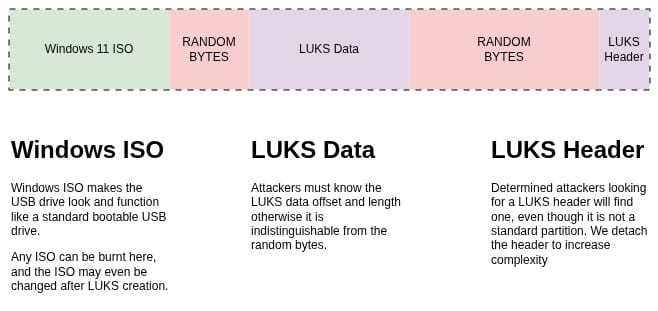
How-to
First thing I did was figure out how to write data to the middle of a USB drive (or rather, with a specific offset from the start.) To fit most ISO files, I figured an offset of 16GiB would be plenty. With dd this is farily easy using the skip= function.
Now it would be very easy to make a file, use cryptsetup luksFormat on that file, and write it to the middle of the USB drive.
# Make 512MiB file to use as LUKS file
dd if=/dev/urandom of=./crypto.bin bs=1M count=512 status=progress

# Setup LUKS file
cryptsetup luksFormat ./crypto.bin

# Clone to USB drive with 16GiB offset, leaving room for the bootable ISO
dd if=./helloworld.txt of=/dev/sdb bs=1M skip=16384 count=512 status=progress
With this setup, the crypto.bin content is not seen as a partition in gnome-disks, nor in fdisk.
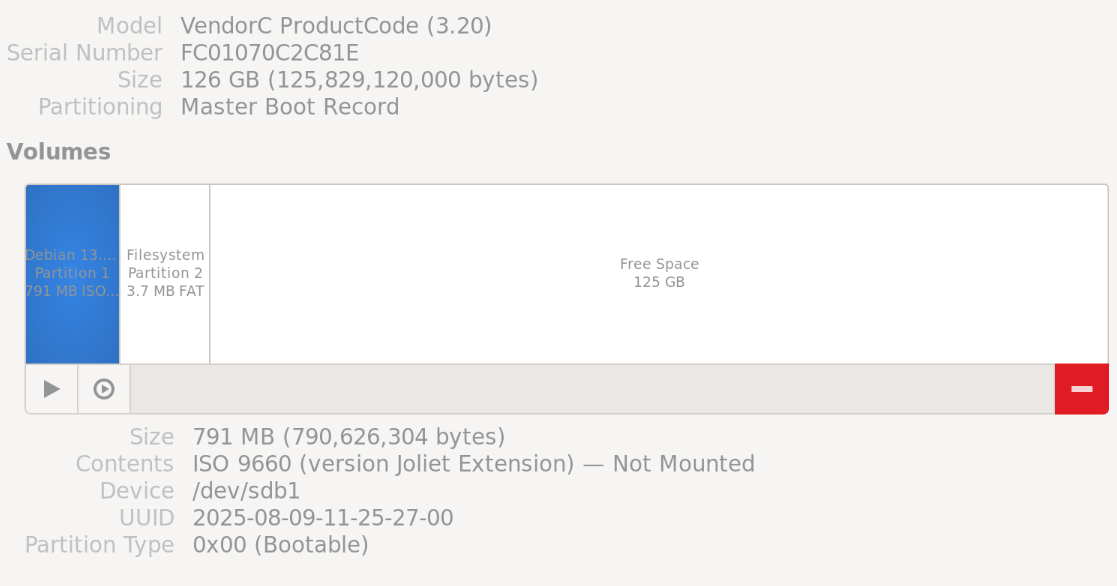
From this point on, we need to understand LUKS better
root@machine:~# cryptsetup luksDump ./crypto.bin
LUKS header information
Version:        2
Epoch:          3
Metadata area:  16384 [bytes]
Keyslots area:  16744448 [bytes]
UUID:           772160e1-f091-4488-9b1d-0dac31678d7c
Label:          (no label)
Subsystem:      (no subsystem)
Flags:          (no flags)

Data segments:
  0: crypt
        offset: 16777216 [bytes]
        length: (whole device)
        cipher: aes-xts-plain64
        sector: 4096 [bytes]

...
Notice this line, offset: 16777216 [bytes], which tells us that the LUKS header is 16MiB long, and the LUKS data length is the whole device. With this, we can split the LUKS file in two pieces. The header, and the data. Without the header, the data is completely useless, and indistinguishable from random bytes.
Since the LUKS partition is sized as the whole device, we need to manually specify the length of data to copy
- Since we want to put the header at the very end of the USB drive, we need to calculate the size of the USB drive in bytes and subtract 16MiB.
- We need to know our LUKS file size. In my case I made it 512MiB, meaning when I subtract the 16MiB LUKS header, my LUKS data size is 496MiB.
An important thing to include is the conv=notrunc in dd. This flag specifies not to truncate any data when writing.
# Calculate device end and subtract 16MiB
# Since we are using a byte size of 1Mib (dd bs=1M) we have to subtract 16MiB in bytes, and convert to MiB through division.
# We can perform mathemtical calculations in the terminal using `bc`
DEVICE_END=`echo "scale=0; ($(blockdev --getsize64 /dev/sdb) - 16777216) / 1048576" | bc`

# Separate LUKS header and write to end of device (only first 16MiB)
dd if=./crypto.bin of=/dev/sdb bs=1M skip=0 seek=$DEVICE_END count=16 conv=notrunc oflag=direct status=progress

# Copy LUKS data to 16GiB offset (skip first 16MiB)
dd if=./crypto.bin of=/dev/sdb bs=1M skip=16 seek=16384 count=496 conv=notrunc oflag=direct status=progress
Now we can do the exact opposite to get the data from the USB drive into crypto.bin
# Extract LUKS header from end of device
dd if=/dev/sdb of=./crypto.bin bs=1M skip=$DEVICE_END seek=0 count=16 conv=notrunc iflag=direct status=progress

# Copy LUKS data (when writing file, seek past first 16MiB to prevent overwriting header)
dd if=/dev/sdb of=./crypto.bin bs=1M skip=16384 seek=16 count=496 conv=notrunc if
lag=direct status=progress
Bash Script
Be careful running this script! dd is a destructive command; blindly running this may cause irreparable data loss!
#!/bin/sh

########################################################################
# Chop up and hide LUKS header and LUKS data on USB drive
# Ensure you double-check your modified constants otherwise you may
# cause irreparable data loss!
#
# https://learn.likogan.dev/obfuscating-luks-in-bootable-usb-drives/
########################################################################

# Constants (MODIFY ME)
OFFSET=16384  # 16MiB
SIZE=512      # 512MiB

DEVICE=/dev/sdb  # !! <- DID YOU CHANGE ME? !!
FILE=/home/user/crypto.bin


# Variables (DON'T MODIFY ME)
DEVICE_END=`echo "scale=0; ($(blockdev --getsize64 /dev/sdb) - 16777216) / 1048576" | bc`
SIZE_MINUS_HEADER=`echo "scale=0; $SIZE - 16" | bc`


# CREATE NEW LUKS FILE
new_luks() {
	echo "Creating new LUKS file at $FILE"
	dd if=/dev/urandom of="$FILE" bs=1M count=$SIZE oflag=direct status=progress
	cryptsetup luksFormat "$FILE"
	cryptsetup luksDump "$FILE"
}


# HOST to DEVICE
host_to_device() {
	# Separate luks header
	echo "Copying LUKS header to end of $DEVICE"
	dd if="$FILE" of="$DEVICE" bs=1M skip=0 seek=$DEVICE_END count=16 conv=notrunc oflag=direct status=progress

	# Copy luks data to OFFSET
	echo "Copying LUKS data to $OFFSET of $DEVICE"
	dd if="$FILE" of="$DEVICE" bs=1M skip=16 seek=$OFFSET count=$SIZE_MINUS_HEADER conv=notrunc oflag=direct status=progress
}


# DEVICE to HOST
device_to_host() {
	# Find LUKS header
	echo "Getting LUKS header from $DEVICE"
	dd if="$DEVICE" of="$FILE" bs=1M skip=$DEVICE_END seek=0 count=16 conv=notrunc iflag=direct status=progress

	# Copy luks data to OFFSET
	echo "Copying LUKS data to $OFFSET of $DEVICE"
	dd if="$DEVICE" of="$FILE" bs=1M skip=$OFFSET seek=16 count=$SIZE_MINUS_HEADER conv=notrunc iflag=direct status=progress

	# Output luksDump
	echo ""
	cryptsetup luksDump "$FILE"
}


# MAIN
new_luks        # Generate LUKS file
host_to_device  # Copy LUKS file to device
rm "$FILE"      # Delete LUKS file to show that data was pulled from USB drive
device_to_host  # Copy data from device to host