Local Apt Package Caching, with DNS Overrides (apt-cacher-ng, opnsense)
apt-cacher-ng is a very easy to setup tool that allows Apt packing caching. I orginally wanted to host a fully fledged mirror for my LAN, but decided a package cache would be an easier and more cost-effective measure.
Setup the apt-cacher-ng server, setup OPNSense Unbound DNS overrides, and get great apt package caching for my entire LAN.
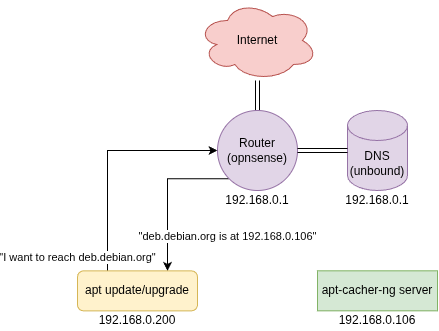
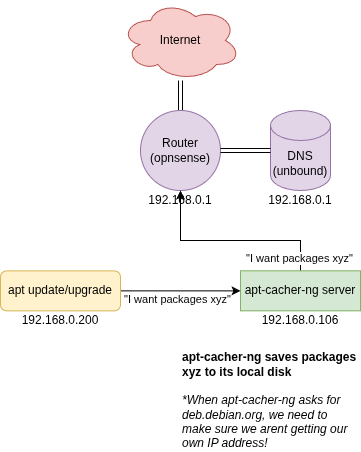
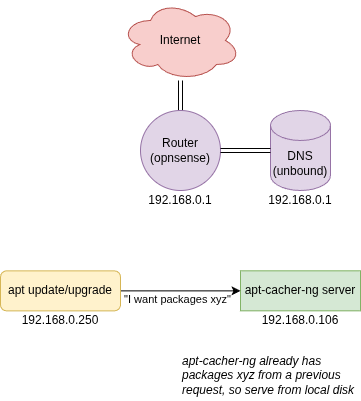
Setup apt-cacher-ng server
I created a new VM on one of my proxmox hosts:
- 1 Core
- 1gb Memory
- 64gb OS Disk (NVMe)
- Debian 13
Install and Configure apt-cacher-ng
apt install apt-cacher-ng
systemctl enable --now apt-cacher-ng
We see apt-cacher-ng listens on 0.0.0.0:3124 by default. Since we are going to be overriding DNS in our router to point to apt-cacher-ng, we need to change this to port 80. Optionally, this is where you change the cache directory, in case you are caching to a separate disk.
Find line Port: 3124 and change it to Port: 80
Now, apt-cacher-ng should be fully ready to go for default deb.debian.org packages.
Override DNS
Since our router will be overriding DNS for deb.debian.org to our local DNS caching server, we need to make sure apt-cacher-ng isnt using our router for dns.
Set /etc/resolv.conf to use your favourite public DNS resolver
# /etc/resolv.conf
# Manually set
nameserver 1.1.1.1
/etc/resolv.conf
I like to additionally run chattr +i /etc/resolv.conf to make sure nothing else messes with my DNS server, just to be safe.
OPNSense Unbound DNS Override
Now we create the Unbound DNS override in opnsense to point deb.debian.org to our local caching server.
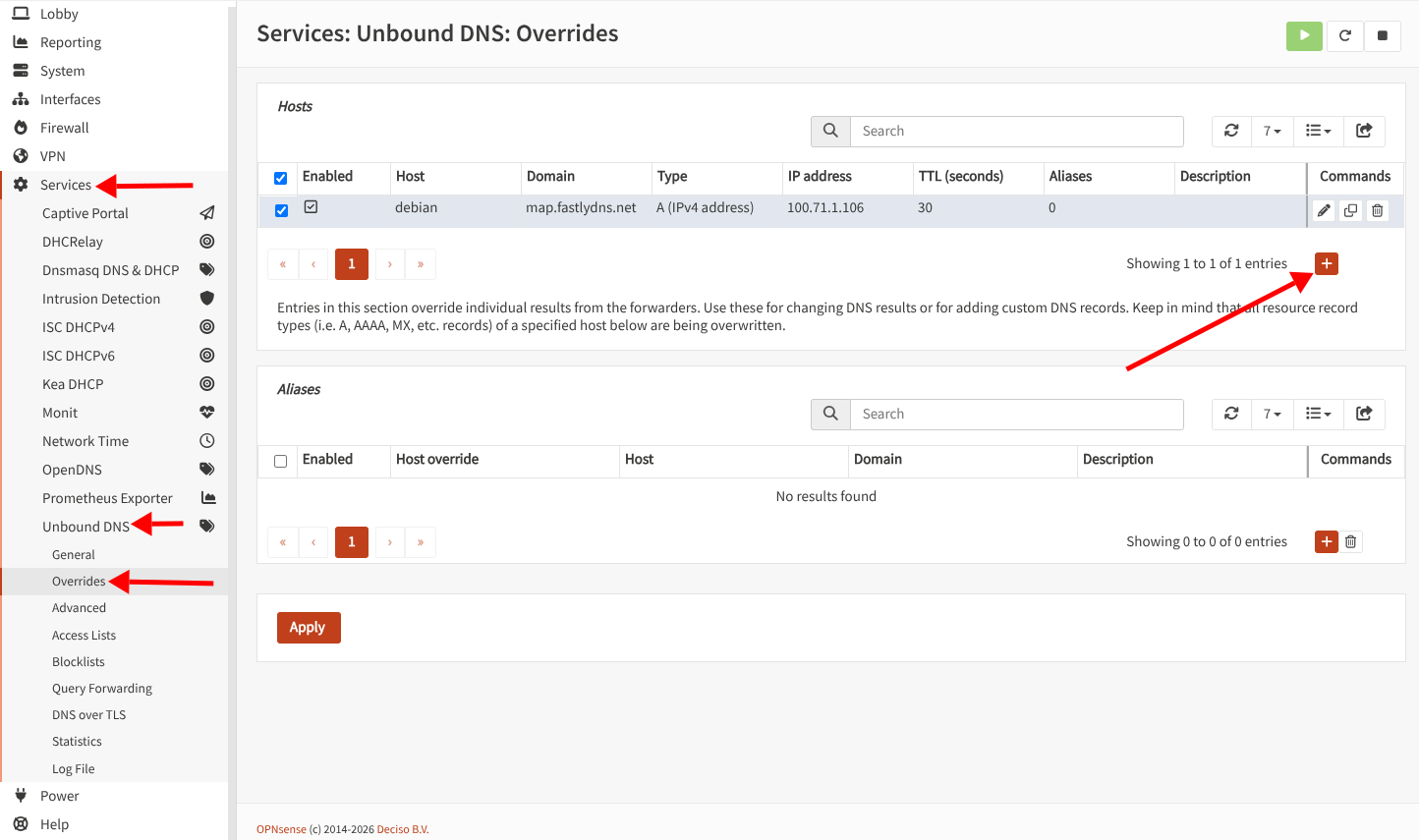
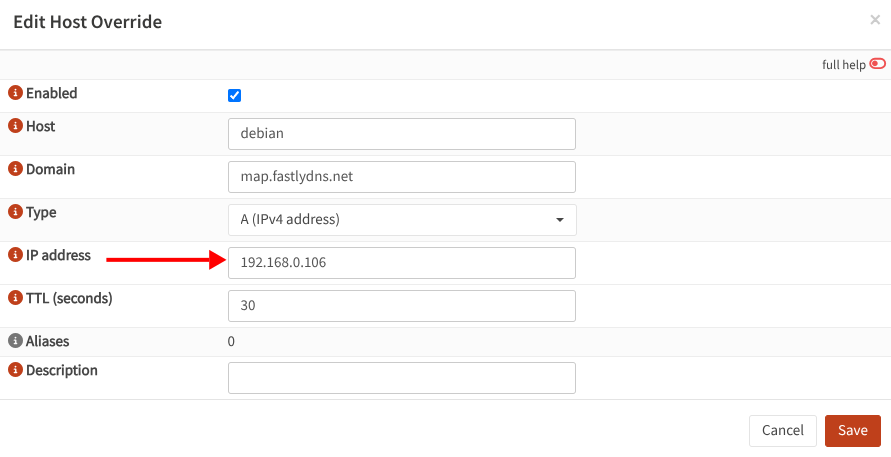
Host......: deb
Domain....: debian.org
Type......: A (IPv4 address)
IP addrses: (your apt-cacher-ng server IP)
Host......: debian
Domain....: map.fastlydns.net
Type......: A (IPv4 address)
IP addrses: (your apt-cacher-ng server IP)You'll notice that I'm just making a DNS record for deb.debian.org, but also for debian.map.fastlydns.net, and this is because apt update actually probes SRV for _tcp.http.deb.debian.org which redirects to debian.map.fastlydns.net. Some older apt clients, or apt http proxies, will not handle the SRV record correctly and probe deb.debian.org anyways.
Ensure DNS is properly configured. Ensure nslookup returns your apt-cacher-ng IP address for both deb.debian.org and debian.map.fastlydns.net
root@client:~# nslookup deb.debian.org
Server:         192.168.0.1
Address:        192.168.0.1#53

Name:   deb.debian.org
Address: 192.168.0.106

root@client:~# nslookup debian.map.fastlydns.net
Server:         192.168.0.1
Address:        192.168.0.1#53

Name:   debian.map.fastlydns.net
Address: 192.168.0.106

root@client:~#
nslookup shows our apt-cacher-ng IP address
Test apt-cacher-ng
Now we are going to test it by running reinstalling an application before and after apt-cacher-ng caches it, we can use the apt --reinstall flag to force apt to pull from its repositories again.
root@client:~# apt install --reinstall prometheus-node-exporter
...
Fetched 4,674 kB in 0s (16.0 MB/s)
...

root@client:~# apt install --reinstall prometheus-node-exporter
...
Fetched 4,674 kB in 0s (178 MB/s)
...
root@CA-AB2-105-Syncthing:~#
I went from 16.0MB/s to 178MB/s! Amazing!
If you want to bechmark caching further, you can clear apt-cacher-ng's cache by rm -rf'ing everything in the /var/cache/apt-cacher-ng/* directory